


Most people hear "automation" and immediately think: Zapier. Make. n8n. Some fancy workflow builder with colorful boxes and lines.
But that's not what automation actually is.
Automation is anything that makes you faster and removes repetitive work. That's it.
It could be a Zapier workflow. It could be a Python script. And it could even be a keyboard shortcut. Yes, that's right.
Once you understand this simple definition, you start seeing automation opportunities everywhere, just like me😉.
Let me show you an example
Think about how much time you spend in your browser every day.
You're reading articles. Researching competitors. Always endup finding that one information you'll need later.
And what do you do? You copy the text, switch tabs, paste it somewhere, then switch back. Over and over again.
This is where I was bleeding time. And here's the thing: Zapier couldn't help me nor n8n could. Because this problem lives entirely within my browser, across dozens of tabs.
So here's how I solved it
So I built a simple Chrome extension to solve this exact problem. And no this is not a ai automation or a rpa!
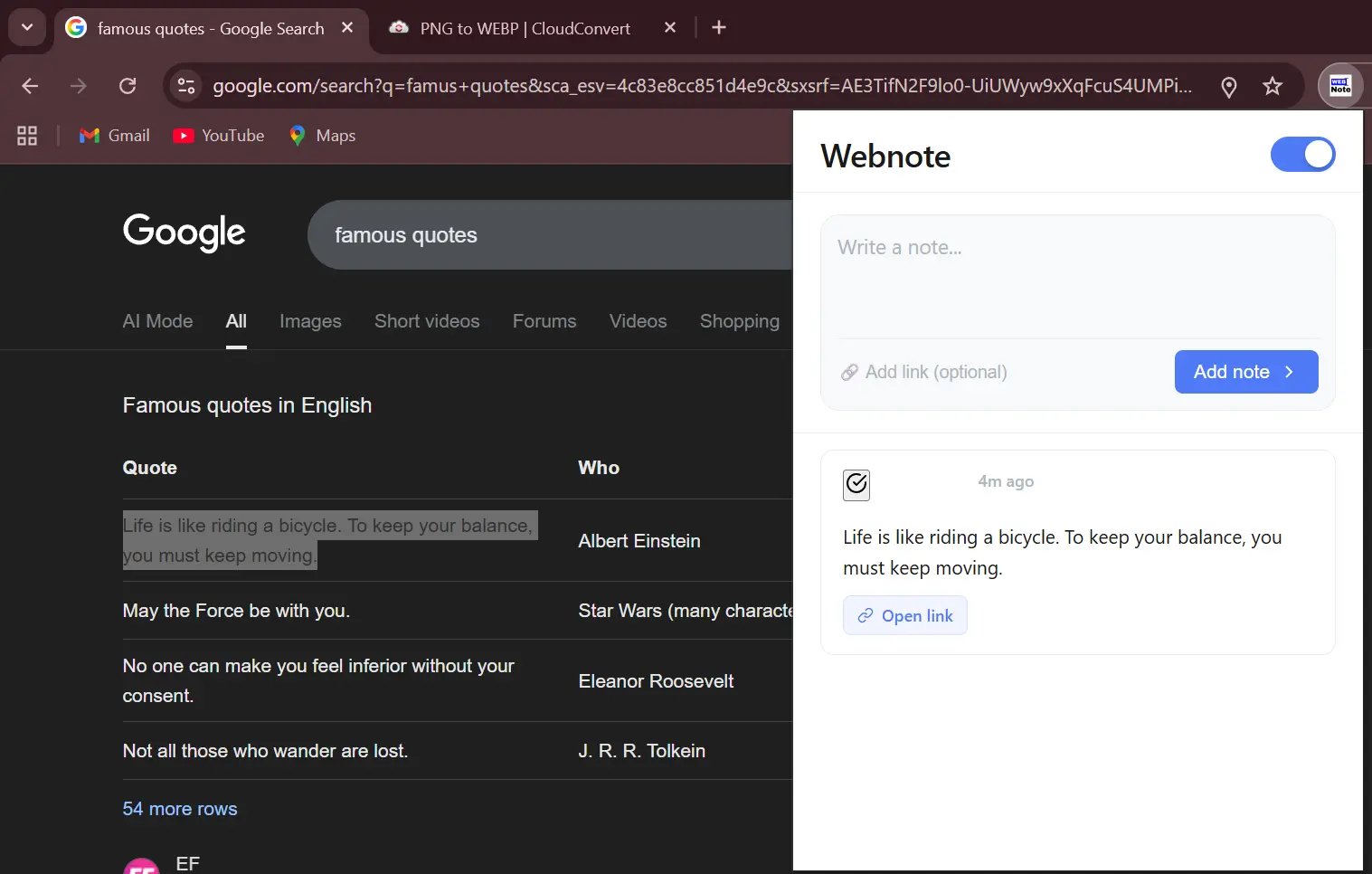
Now when I see something worth saving, I just select the text. A floating icon appears similar to Grammarly or other browser tools you might be familiar with. One click, and it's saved.
No tab switching. No copy-pasting. Just instant capture.
All my saved notes live right in the extension popup, accessible anytime. It's like having a personal Instagram saved folder, but for text snippets from anywhere on the web.
Taking It Further: From Notes to Action
But here's where it gets interesting.
Most saved information just... sits there. Just like your Instagram saved folder😂.
I needed a way to separate the truly urgent items from general reference material. So I added one more feature: Send to CRM.
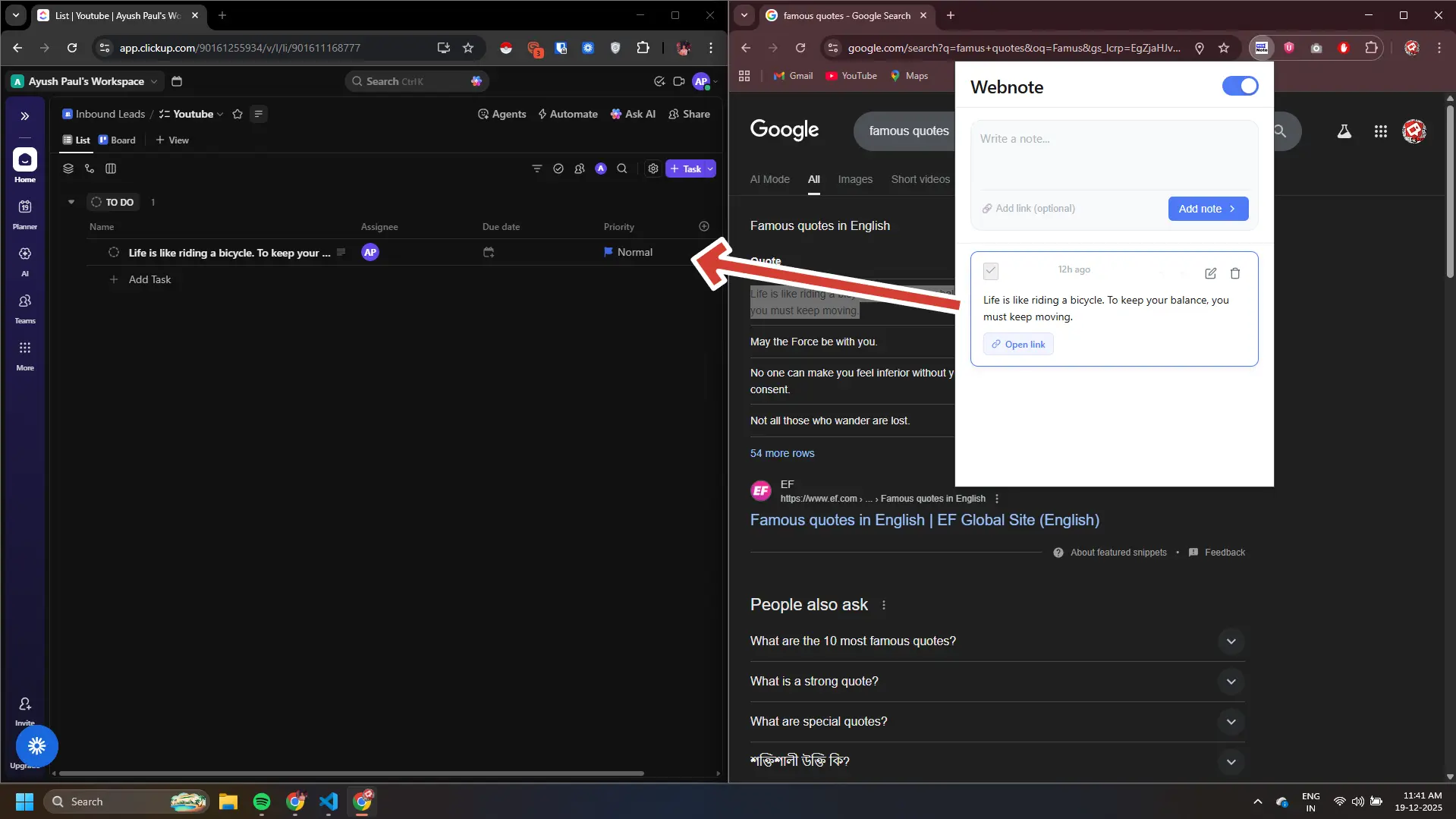
Each note has a small ClickUp button. One click, and the note transforms into a properly formatted task in my project management system, assigned to me, ready for action.
No switching tabs. No copy-pasting information. No manual task creation.
Just: You see something important → click → done.
What's Actually Happening Under the Hood
The technical implementation is surprisingly straightforward. The extension uses a few key files working together:
Content Script (content.js) - Runs on every webpage you visit. Creates the floating icon when you select text and handles the capture modal.
Popup Interface (popup.js & popup.html) - Your notes list lives here, accessible from the extension icon in your toolbar.
Storage Layer (storage.js) - Saves everything locally in your browser using Chrome's storage API. Your notes persist even after closing the browser.
ClickUp Integration (clickup-integration.js) - This is where the magic happens:
- Formats the task name - Takes the first line or first 100 characters of your note
- Builds the description - Includes your full note text, the source URL (if you saved one), and a timestamp
- Sends to ClickUp's API - Creates a properly formatted task with a single HTTP request
That's it. Capture data when you need it. Send it where you need it. No copy-paste required.
The Real Lesson Here
This isn't really about Chrome extensions.
This is about changing how you think about automation.
Most people overcomplicate it. They build complex workflows when a keyboard shortcut would solve the problem.
The best automation is often the one that fits perfectly into your existing workflow so seamless you barely notice it's there.
What I Actually Do
This is exactly I do for clients. I find where you are bleeding time, and plug the leak.
Sometimes it's a Zapier automation. Sometimes it's a custom web application. Sometimes it's a Chrome extension like this one. Sometimes it's just reorganizing your existing tools in a smarter way.
The possibilities are endless when you stop thinking about "automation tools" and start thinking about "removing friction from work."
If you're doing any repetitive process more than twice a week, automate it. Your future self will thank you.
Or you can book a meeting with me to discuss if you wantsome one to handle all of these for you. Book a meeting